More than just a transcription tool.
Xpanion turns the meeting into the project.
Fully local — no cloud.
Speaker-separated minutes, a plan that compounds every week, and billable hours you can prove — generated entirely on your Mac. No bot. No cloud. And the part that matters most to every user: your meeting data never leaves your machine.
Don't let anyone turn your meetings into a cloud "context layer."
Every cloud notetaker is building the same thing: a permanent archive of what your company says, held on a server that isn't yours. That archive is the product. Xpanion refuses the premise. The recording is never written. The transcript never leaves. The project that grows out of it — the board, the plan, the hours — is yours, on your Mac, readable long after any subscription ends.
The record was never the point. The project underneath it was.
The work was never the problem. Too many different tools were.
Transcription, minutes, time tracking, Kanban and Gantt — everything it takes to run a project, in one place, and simple enough to actually use.
A transcript is where the thinking stops.
Transcription is a commodity now. A ten-page transcript records everything that was said and nothing of what it meant — then it goes into a folder no one reopens. Action items don't move. Last week's decisions are in another file you would have to go and find. The project the meeting was about never assembles itself, so you re-read, re-summarize, and re-explain. Every week.
And the hours you spent in those rooms? The ones nobody writes down never reach an invoice. That isn't a rounding error. That's revenue.
Sovereignty over your data comes first.
Your conversations and your data stay on your device. Sovereignty is local, not cloud-based. Xpanion is privacy and sovereignty by design.
Yours never leaves the Mac.
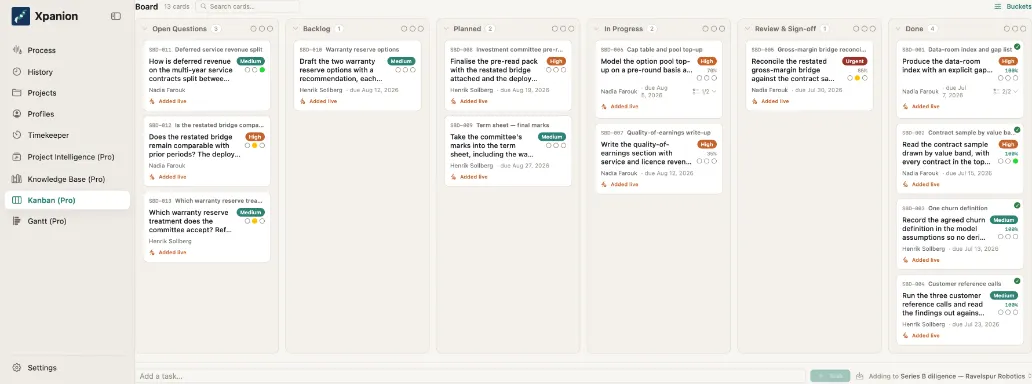
Your meeting becomes minutes. Tasks land on a Kanban board on their own, a straightforward Gantt tool keeps the schedule, and the buckets export in a single step. Work, track, succeed, repeat.
Stated plainly, not as a swipe: this is an axis, not a feature race. A tool that doesn't depend on your data leaving your machine gives you a kind of security that makes cloud-based tools look like the wrong choice.
- Hours / month
- Billable time is easily lost to under-recording and can add up to many hours per month. Xpanion logs it automatically.
- 0
- Bytes of meeting data that ever leave your Mac. What does go out — license check, model download, update check — carries nothing from your meetings.
- 1
- One project, several views: minutes, Kanban, Gantt. Xpanion isn't only a transcription tool — it makes the work accountable and professional.
Four steps. The fourth is where it stops being a notetaker.
- 01
Capture
Audio is held in memory and discarded the moment it's processed. There's no recording file — nothing to leak, lose, or be asked to hand over later. No bot ever joins the call.
- 02
Transcribe
On-device transcription with speaker separation, running natively on Apple silicon. Your voice never travels to a server to become text — and transcription works offline.
- 03
Structure
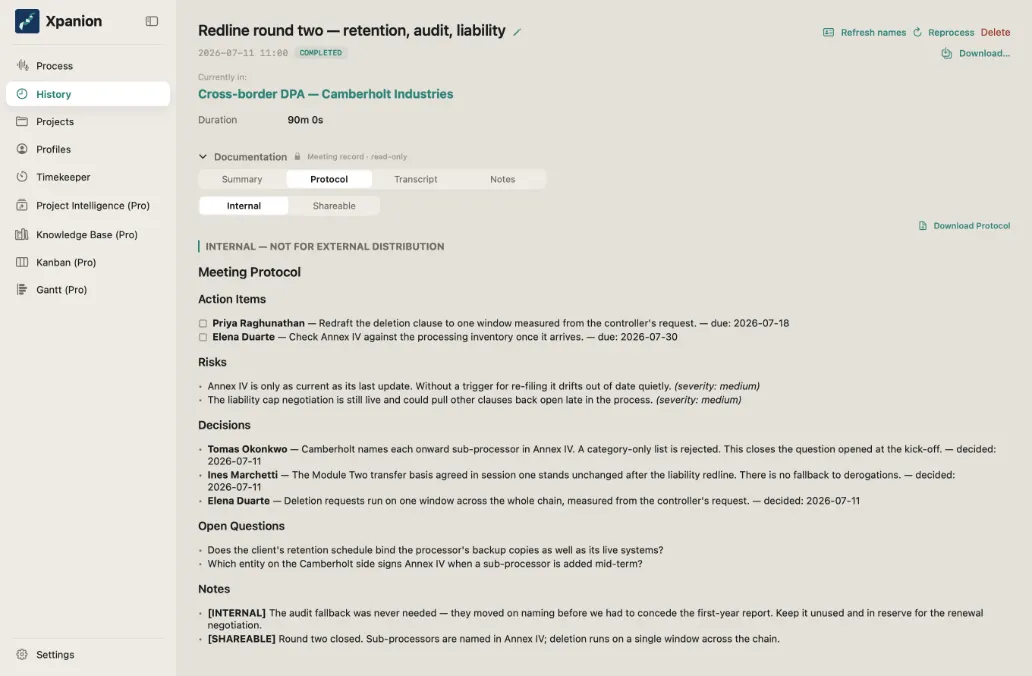
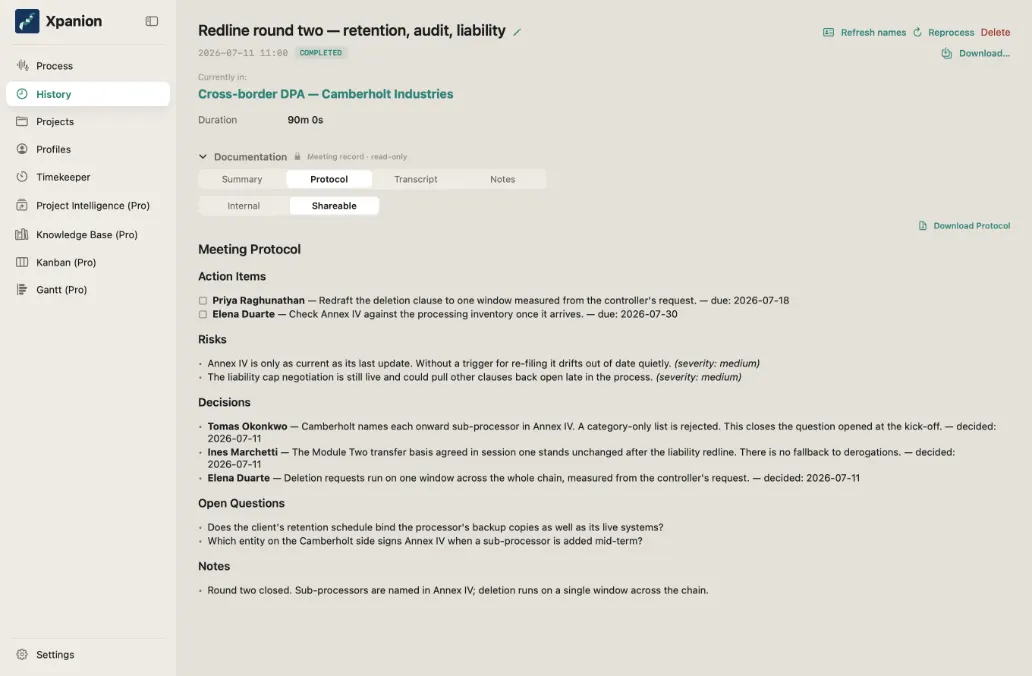
Every meeting becomes clean minutes — decisions, actions with owners and dates, risks, and open questions — with your own comments split into what stays internal and what's safe to share.
- 04The difference
Compound
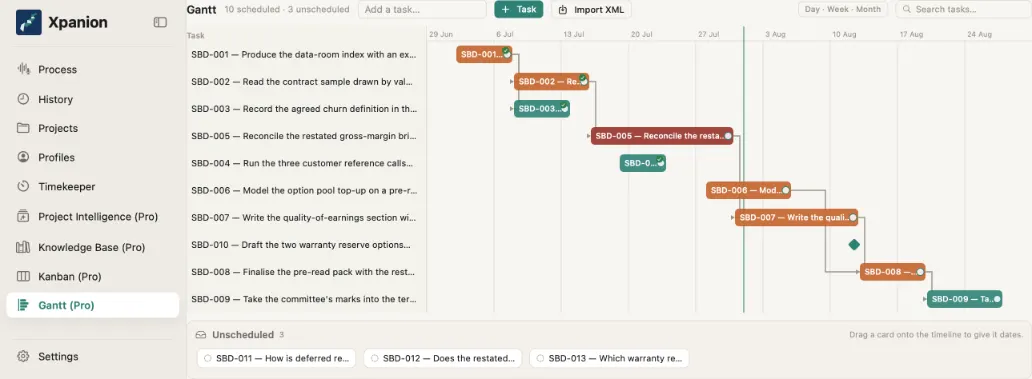
The minutes of every meeting land in the same project, and the actions it produces flow straight onto the Kanban board and the Gantt plan. The board is the part that carries: it stays current across meetings, and its state can be pulled into the next minutes — so the newest meeting can be written against where the project actually stands, not against a blank page. Board and plan are in every plan, with a full XML export.
Watch the minutes write themselves
You don't write the minutes. As the conversation is transcribed on-device, Xpanion separates the talk from the substance, and the decisions, actions, and risks fall into place on their own. The candid internal version stays with you; the clean shareable version is one tap away.
Each meeting builds on the last.
Recurring meetings stop being a folder of disconnected notes and become one project. The minutes of every meeting land in the same place, and the actions from each meeting flow onto one Kanban board and one Gantt plan. Open questions stay open until they are answered, and the current state of the board can be pulled into the next minutes, so the minutes of meeting #7 are written against what meetings #1 to #6 actually left standing.
One thread, not seven files
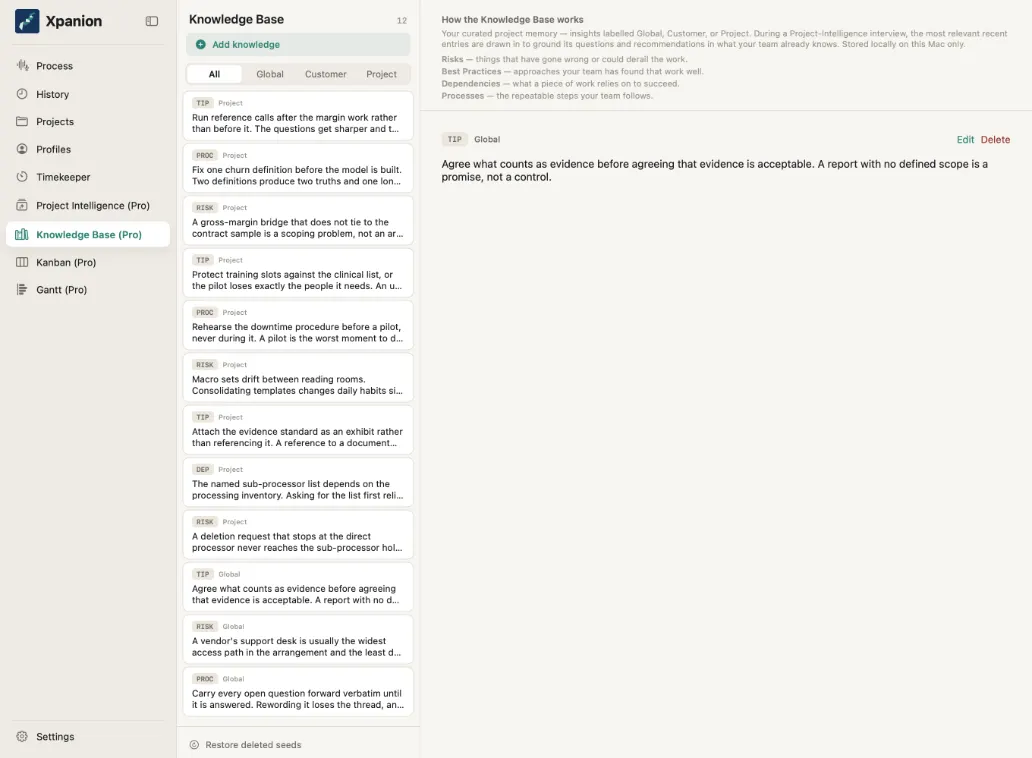
The minutes of meeting #7 of this migration were written against the board that meetings #1 to #6 built. The project diary records how the plan changed and why. The knowledge pool keeps the risks and lessons that tend to repeat. When you need to brief a stakeholder, the plan is already current — the board and the XML export are yours in every plan, with no re-keying.
Your own institutional memory
The hours you forgot to write down.
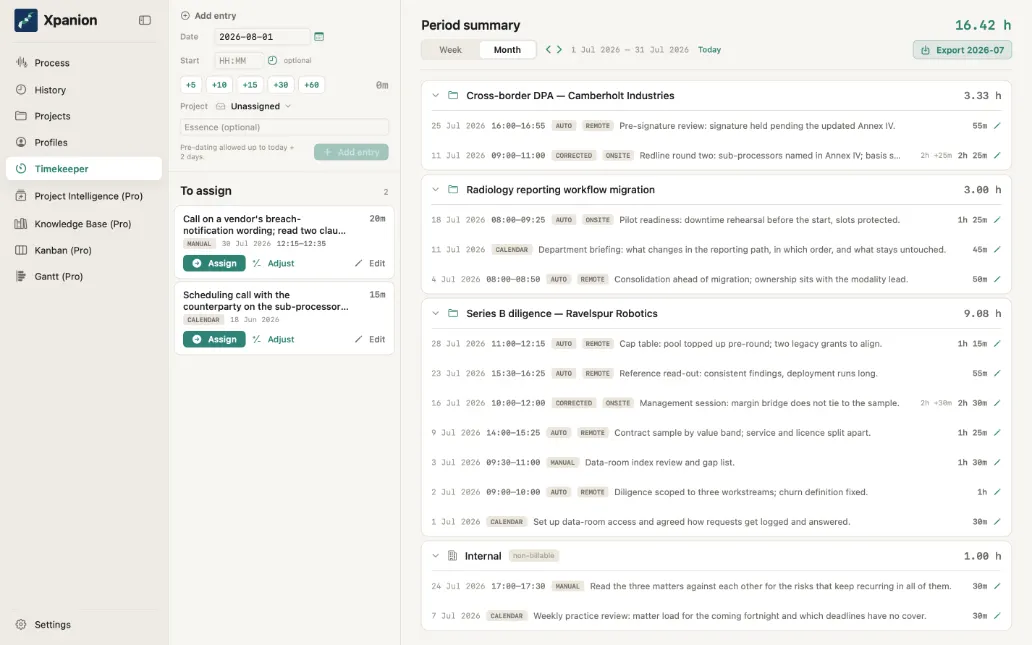
A bonus tab, not a separate tool. Because Xpanion already knows when your meetings happened, your billable time logs itself — no timer to start, no timesheet to keep. The hours you'd have under-billed simply come back.
An assign-inbox, not a stopwatch
Auto-logged meetings, calendar blocks, and the occasional manual line all land in one list. One gesture assigns each entry to a project — or to Internal, which still counts as worked time. Preparation and follow-up snap on in +5 / +10 / +15 / +30 / +60 increments and can be freely combined. The right pane sums the week and the month as you go.
The ledger is append-only and hash-chained, signed locally on your Mac — tamper-evident, so the hours you show a client hold up. (Tamper-evident, not "court-proof." That judgment stays yours.) A single export writes the full billable record — travel and expenses included — straight into the format your billing system expects.
The month, already added up
Specific, not vague.
- Speaker-separated transcript
- On-device transcription that knows who said what — no audio file written, no server round-trip to turn voice into text.
- Decision & action extraction
- Decisions, actions with owners and due dates, risks, and open questions — pulled into structure, not left in a transcript.
- Internal ⟷ shareable
- Two versions of the minutes from one meeting: the candid internal record, and the clean version safe to send outside the room.
- Living project plan
- Phases, tasks, owners, dates and dependencies, built up from your meetings as they happen, with XML export (.xml) and no re-keying.
- Living Kanban board
- The same tasks appear on a Kanban board. Straightforward project tracking, and it can be included in any minutes export — soon with a connector to your AI coding tool: point it at the open tasks and it picks up its instructions from there.
- Cross-project knowledge pool
- The risks and lessons that repeat across projects, surfaced where they matter: your own institutional memory, on your terms.
- Tamper-evident time ledger
- Auto-logged, append-only and hash-chained — billable hours you can stand behind, plus a one-export billing and expense interface.
The same tasks, two views
Four lines we won't cross.
These aren't settings you toggle. They're how the product is built. There is no cloud path to disable, because we never built one.
- INV-1Audio is never written to disk
- Capture lives in memory and is discarded the instant it's processed. There is no recording file to leak, subpoena, or lose.
- INV-2Meeting data never leaves your Mac
- Transcripts, minutes, and plans stay on your machine. Nothing from your meetings ever leaves your Mac — Xpanion only checks your license, downloads its models once, and looks for updates.
- INV-3Nothing is trained on your data
- The model runs locally on Apple silicon. Your conversations are never used to improve anyone's model — ours or otherwise.
- INV-4Voiceprints vanish
- Speaker separation happens in memory and is never stored or linked across meetings. The voiceprint exists for the length of the meeting, then it's gone.
An honest line, because trust is built on them: Xpanion documents that a disclosure was made — it does not certify that recording is lawful where you are. That judgment is always yours.
A category above the note-taker.
Plenty of tools transcribe. A few even keep the data on your device. Xpanion starts where they stop: it turns the meeting into a project — and never lets the project leave your machine.
- Architecture · On-device by design
- Privacy isn't a buried toggle. Your meeting data has no path to the cloud, because that path was never built.
- Outcome · A project, not a transcript
- Where note-takers end at text, Xpanion produces the thing the text was about: a living plan that compounds week over week.
- Scope · One toolset, not five
- One project, one place. What would otherwise be five separate subscriptions is five views of the same work.
Built for conversations that can't leave the room.
Xpanion is for anyone who runs projects and has to keep track of a lot of moving parts in daily business life.
Law, medicine, finance, and any team under a duty of confidence. Xpanion gives you modern meeting intelligence without asking you to send privileged conversations anywhere.
Every feature in every plan. Pick by people and projects.
Free
$0 / month
€0 / month
USD plus tax · EUR VAT included
No payment method — just your email
- 1 person
- 1 active project
- Every feature included
By starting you accept the Subscription & Software Terms.
Your Mac · free
Solo
$15 / month
€15 / month
USD plus tax · EUR VAT included
or $150 · €150 / year — two months free
- Up to 5 people
- 5 active projects
- Every feature included
By subscribing you accept the Subscription & Software Terms.
Your Mac · subscription
Team
$49 / month
€49 / month
USD plus tax · EUR VAT included
or $490 · €490 / year — two months free
- Up to 15 people
- 20 active projects
- Every feature included
By subscribing you accept the Subscription & Software Terms.
Your Mac · subscription
Studio
$249 / month
€249 / month
USD plus tax · EUR VAT included
or $2,490 · €2,490 / year — two months free
- Up to 50 people
- 50 active projects
- Every feature included
Your Mac · set up with us
Business
$599 / month
€599 / month
USD plus tax · EUR VAT included
or $5,990 · €5,990 / year — two months free
- Up to 200 people
- Unlimited active projects
- Every feature included
Your Mac · set up with us
Unlimited
$1,199 / month
€1,199 / month
USD plus tax · EUR VAT included
billed yearly only — $11,990 · €11,990 / year
- Unlimited people
- Unlimited active projects
- Every feature included
Your Mac · set up with us
One boundary, stated plainly: whichever plan you choose, your meetings stay on your Mac.
Free starts with just your email address: no payment method, no account. Studio, Business and Unlimited are set up with us directly — talk to us.
On a plan for several people, everyone works on their own Mac, with their own boards. Active projects are counted across the whole plan. A shared team folder is coming soon.
If you ever stop paying, nothing disappears. Everything you have recorded stays on your Mac — readable, searchable, exportable. You simply cannot record or change anything new until you come back.
FAQ
- Does Xpanion join my meeting as a bot?
- No. Xpanion captures system audio on your Mac. Nothing appears in the participant list, no one is notified by a bot, and there is no recording file — audio is held in memory and discarded the instant it's processed.
- Does my meeting data go to the cloud?
- Never. Transcripts, minutes and plans stay on your machine. Nothing from your meetings ever leaves your Mac — Xpanion only checks your license, downloads its models once, and looks for updates.
- Does it work offline?
- Yes, with one exception: adding a new project needs a connection, because Xpanion checks with our license service that your plan has room for it. Recording, processing and working in the projects you already have keep working without one. Transcription, speaker separation, and the language model all run on-device on Apple silicon, so a flaky connection doesn't stop you. Xpanion checks your license over the internet when you activate it, re-check it or change your plan, when you return to Xpanion shortly after opening the payment page, and periodically after that.
- How is this different from an AI notetaker?
- A notetaker ends at text. Xpanion compounds your meetings into a living project plan and a Kanban board — with a full XML export — keeps a tamper-evident record of your billable time, and never lets any of it leave your Mac.
- Can I actually prove my billable hours?
- Timekeeper logs your time automatically into an append-only, hash-chained ledger signed locally on your Mac — tamper-evident, not "court-proof." One export writes the full billable record, travel and expenses included, into your billing system's format. The export is an Excel list.
- Is it a subscription?
- Free costs nothing: one person and one active project, started with just your email — no payment method. Solo and Team are monthly or yearly subscriptions you can cancel at any time; the plan then runs to the end of the period you've paid for. Studio, Business and Unlimited are set up with us directly. If a paid plan ends, nothing disappears: everything you've recorded stays on your Mac — readable, searchable and exportable. You just can't record or change anything new until you come back.
- Why does a local tool cost monthly?
- Because the work never stops. The models improve, macOS moves under us, and the minutes engine gets better every month — your subscription pays for that, not for a server farm holding your recordings. Nothing about the price changes where your data lives: it stays on your Mac. And if you ever stop paying, everything you recorded stays readable, searchable and exportable.
- How do I manage or cancel my subscription?
- Xpanion is sold through Stripe. Your receipts, your payment method and your plan are managed in your Stripe Link account — the email you bought with is the key. To cancel, you don't need to sign in anywhere: use the cancellation page linked in the footer of every page. We confirm every cancellation by email, and the plan runs to the end of the period you have paid for.
- What happens on first launch?
- After you activate a license, Xpanion downloads the speech and language models it runs from Hugging Face and keeps them on your Mac. Until that download has finished you can't record; after it, the app works offline, except that adding a new project needs a connection. The download is about 7 GB. On a 100 Mbit/s connection that is roughly ten minutes; on a faster line, correspondingly less.
- Does a bigger plan need a bigger Mac?
- No. Every plan runs on a 16 GB Apple silicon Mac, with the same models and the same features. A bigger plan covers more people and more active projects — not a bigger machine.
- Moving to a new Mac or lost your key?
- Install Xpanion on the new Mac from xpanion.com/download and activate it with your license key. If you no longer have your key, request a new one at portal.xpanion.com/recover — we send a new pickup link to the email address your license was bought with, or the one your granted license was sent to. This works for a plan for one person; for a plan with several people, contact us. The same goes for an address that holds two or more licenses of the same plan bought on the same day, or two or more granted licenses: the page cannot tell their keys apart and sends no link for them.
Your meetings, finally working for you.
Modern meeting intelligence that never asks you to give up your data. Run it on your Mac, keep everything, and see your projects run smoother than ever.